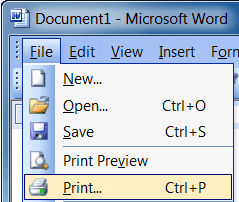
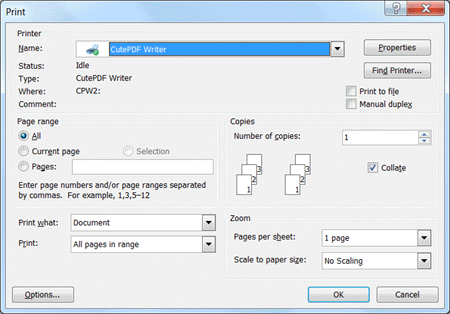
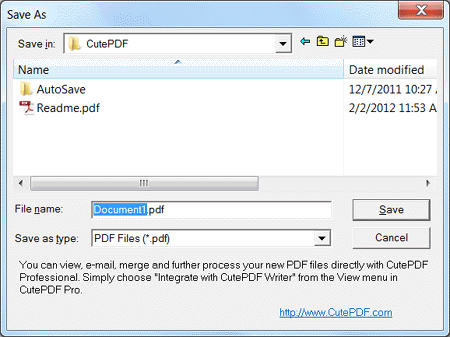
Using CutePDF Writer to create professional quality PDF documents
Related Articles
Create an Ad-hoc Conference Call using your Desk Phone
Conference calls allow you to easily setup a call between multiple users – up to 32 callers (licence permitting). Although many conference call services exist, it’s often easier and cheaper to host your own audio conferences. You can set-up Ad-hoc ...
Using your Microsoft 365 Email
Welcome to your Microsoft 365 email account. This article will link you to various other articles to help you configure your email service. If you have any issues in following these instructions, please feel free to contact the PowerBiz Helpdesk - ...
How to Send a Fax using the PowerBiz Fax Service
The PowerBiz Fax Service is a simple service that will transmit a fax via email. To send a fax: Compose an email to fax@powerbiz.com.au In the subject line, put in the 10 digit fax number (including area code) Attach the PDF which is the fax to be ...
Set up email using the iOS Mail app
Set up email using the iOS Mail app Outlook for Office 365 Office 2019 Outlook for Office 365 for Mac Office 2019 for Mac More... If you're trying to sign in to Office with your Microsoft account, you may get a message asking you for parental ...
Create signatures and send automatic replies in Outlook on the web
Note: Features and information in this guide apply to Outlook on the web as available through Microsoft 365. Create a signature Select Settings > View all Outlook settings > Compose and reply. Create your signature. Select if you want to: ...